Admob Plugin
Import
- Or follow these steps:
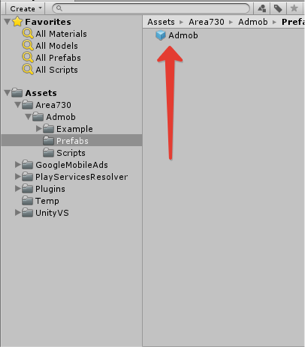
- Drag Admob prefab from Area730/Admob/Prefabs into your scene. You need to add this prefab to your game only once as AdmobManager is a singleton.
- Set Admob unit ids and you are almost done
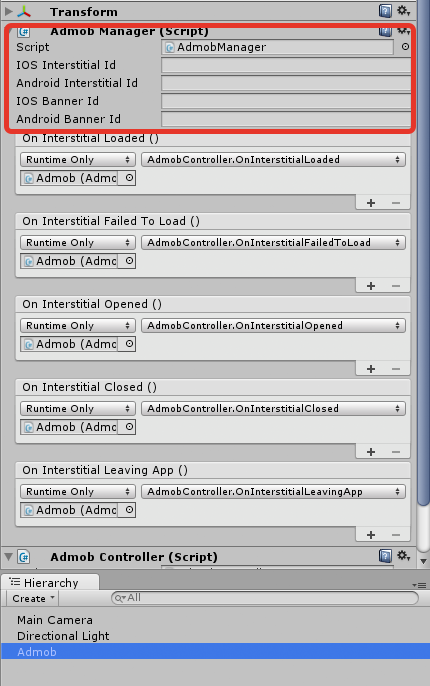
To show banner call AdmobManager.Instance.RequestBanner(AdPosition position) where position is enum and can be:
AdPosition.Top
AdPosition.Bottom
AdPosition.TopLeft
AdPosition.TopRight
AdPosition.BottomLeft
AdPosition.BottomRight
You can also specify the size of the banner as second parameter. The default size is 320x50. To show interstitial you have first to load it by calling AdmobManager.Instance.RequestInterstitial(). After the interstitial is loaded, the OnInterstitialLoaded() callbacks will be invoked. Admob prefab comes with default attached callback functions (see Area730/Admob/Scripts/AdmobController.cs). You can also add your own if you want.
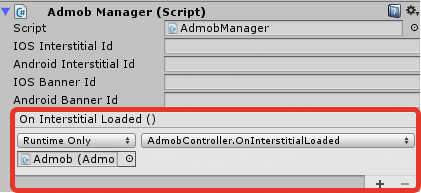
After the interstitial is loaded, you can show the ad by calling AdmobManager.Instance.ShowInterstitial().
Building projects
After configuring your mediation you need to build your game to mobile devices. Sometimes it might cause some errors next section helps you to solve it.